Search pages commonly promote an Android APK or an iPhone web shortcut. This guide does not host either. It shows how to assess the file, source and permissions first.
An APK installed outside Google Play bypasses store distribution checks and may require you to allow installs from an unknown source. That does not prove malware, but it transfers the verification burden to you.
For a money-related service, device compromise can expose messages, notifications, stored passwords, contacts and payment apps.
02
Stop if you see these instructions
Disable Play Protect or antivirus.
Give accessibility-service or device-admin access without a clear need.
Install a “security update” sent in chat.
Allow screen sharing while a banking or UPI app is open.
Ignore a browser or operating-system warning.
Download a renamed ZIP or file with a double extension.
03
A practical verification sequence
Identify the publisher.Find a legal entity and a primary source linking it to the file.
Confirm the distribution route.A third-party page claiming “official APK” is not enough.
Check permissions.Ask why the app needs contacts, SMS, accessibility or file access.
Keep safeguards on.Never disable operating-system protection to complete an install.
Do not mix with banking.Avoid unknown apps on the same device used for payments.
04
iPhone “app” claims
A website added to the iPhone Home Screen may be a progressive web app or simply a shortcut. It is not necessarily App Store-reviewed. Check the hostname each time and understand that the same web-service, identity and legal questions still apply.
05
If you already installed a suspicious app
Disconnect the device from networks, remove sensitive permissions, uninstall the app, scan the device and change exposed credentials from a different trusted device. Review bank and UPI activity. If money or identity data may be compromised, contact the relevant provider and report cybercrime promptly.
Is an iPhone Home Screen shortcut an App Store app?
Not necessarily. A website can be saved as a shortcut or web app without App Store distribution.
Is an HTTPS download safe?
HTTPS protects data in transit; it does not establish that the file or publisher is trustworthy.
Detailed app and APK download safety guide
A complete decision framework for 99exchange app, APK and mobile-device safety
Direct answer: Do not install an app merely because its filename, icon or landing page uses the expected brand. Verify the source, permissions, signing information, device warnings and removal path first; when those checks cannot be completed, the browser is usually the lower-commitment option.
Treat the subject as a decision file rather than a sales page. The goal is to collect enough reliable context to choose a safer next step, including the choice to stop. The page focus here is 99exchange app, APK and mobile-device safety. One positive sign never erases a serious contradiction. Evaluate identity, terms, credentials, money and responsible-use controls separately, then base the decision on the weakest material link.
Use evidence that can be revisited: exact hostnames, written terms, transaction references and official sources. Screenshots can preserve context, but they do not turn an unsupported claim into proof. 99exchange Guide does not receive passwords, OTPs, payment credentials or identity documents, and it cannot verify private account outcomes.
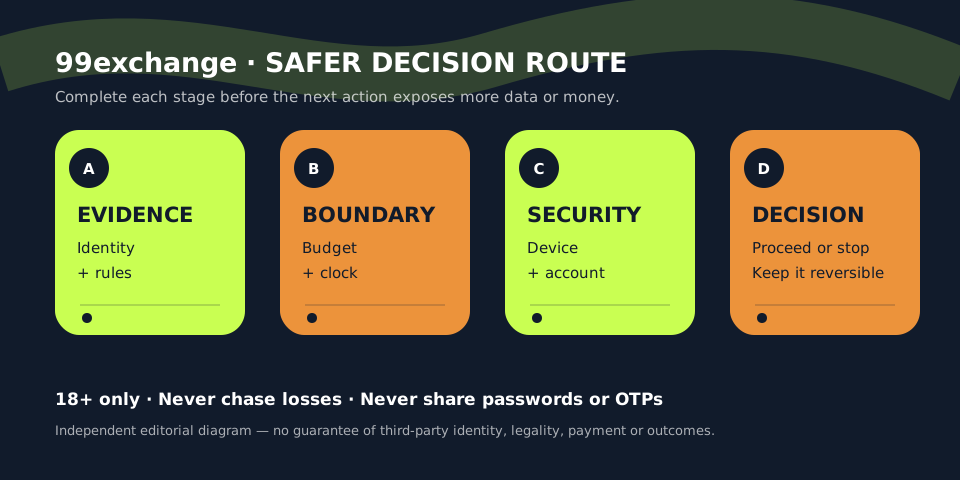
A four-stage review for 99exchange app, APK and mobile-device safety: verify the claim, set the boundary, protect sensitive data and pause when evidence is incomplete.
Terminology before action
Six terms that make this page easier to use
Definitions matter because a familiar word can create false confidence. Read the term together with the rule, screen or evidence that gives it meaning. If a third-party page uses different language, do not assume the outcome or obligation is unchanged.
01
APK file
An Android application package that can install software outside an app store when sideloading is enabled. In the context of 99exchange app, APK and mobile-device safety, use this term only as precisely as the applicable page or rule allows; similar labels can conceal different conditions.
02
Sideloading
Installing software from a file or website rather than a platform’s normal reviewed store route. In the context of 99exchange app, APK and mobile-device safety, use this term only as precisely as the applicable page or rule allows; similar labels can conceal different conditions.
03
App signature
Cryptographic signing information used to associate releases; an unexpected signature can indicate a different publisher. In the context of 99exchange app, APK and mobile-device safety, use this term only as precisely as the applicable page or rule allows; similar labels can conceal different conditions.
04
Permission scope
The device capabilities an app requests, such as messages, contacts, accessibility, storage or notifications. In the context of 99exchange app, APK and mobile-device safety, use this term only as precisely as the applicable page or rule allows; similar labels can conceal different conditions.
05
Checksum
A file fingerprint that can reveal whether a download changed, provided a trusted source publishes the expected value. In the context of 99exchange app, APK and mobile-device safety, use this term only as precisely as the applicable page or rule allows; similar labels can conceal different conditions.
06
Web app
A browser-delivered experience that can reduce installation exposure but still requires hostname and account checks. In the context of 99exchange app, APK and mobile-device safety, use this term only as precisely as the applicable page or rule allows; similar labels can conceal different conditions.
A repeatable process
Step-by-step checklist
Follow these steps in order. Earlier checks are deliberately low commitment; later steps can expose identity, device access or money. Stop as soon as a material requirement is unclear or conflicts with your legal, financial or personal boundary.
Confirm the source
Start from a route verified independently; do not trust a download link forwarded through chat. Complete this check before moving to a step that exposes more personal information or money. Record what you verified, where you found it and what remains uncertain.
Read the filename carefully
Look for misspellings, doubled extensions, compressed archives and instructions that hide the real file type. Complete this check before moving to a step that exposes more personal information or money. Record what you verified, where you found it and what remains uncertain.
Keep device protection enabled
Do not disable scanning or security controls simply because a page says they create a false warning. Complete this check before moving to a step that exposes more personal information or money. Record what you verified, where you found it and what remains uncertain.
Review requested permissions
Compare every request with the app’s stated function and refuse access that is unnecessary. Complete this check before moving to a step that exposes more personal information or money. Record what you verified, where you found it and what remains uncertain.
Check publisher continuity
Updates should come through a consistent source and should not unexpectedly change the signing identity. Complete this check before moving to a step that exposes more personal information or money. Record what you verified, where you found it and what remains uncertain.
Test without sensitive exposure
Avoid storing banking screenshots, OTPs or passwords on a device used to test unknown software. Complete this check before moving to a step that exposes more personal information or money. Record what you verified, where you found it and what remains uncertain.
Know how to remove it
Document uninstall, permission-revocation and account-security steps before relying on the installation. Complete this check before moving to a step that exposes more personal information or money. Record what you verified, where you found it and what remains uncertain.
Compare the signal with the response
Decision table for 99exchange app, APK and mobile-device safety
Use the table to convert observations into actions. It avoids two common extremes: treating a small positive sign as total approval, or continuing to send information and money merely to resolve uncertainty.
What you observe
What it means
Safer next step
Verified store listing exists
Platform checks offer some screening. This is a decision signal, not a complete safety verdict.
Still inspect publisher and permissions. Keep the response within your pre-set money, time and privacy boundaries.
Only a chat attachment exists
Source and update chain are weak. This is a decision signal, not a complete safety verdict.
Do not install it. Keep the response within your pre-set money, time and privacy boundaries.
Accessibility access requested
The app may observe or control actions. This is a decision signal, not a complete safety verdict.
Reject unless the need is clear and trusted. Keep the response within your pre-set money, time and privacy boundaries.
Protection must be disabled
A major safety control is being bypassed. This is a decision signal, not a complete safety verdict.
Stop the installation. Keep the response within your pre-set money, time and privacy boundaries.
Browser covers the task
No install is necessary. This is a decision signal, not a complete safety verdict.
Prefer the verified web route. Keep the response within your pre-set money, time and privacy boundaries.
Risks worth spotting early
Common mistakes and why they matter
Most preventable harm begins with a shortcut: assuming the name proves identity, letting urgency replace verification, or redefining an affordable limit after a loss. These patterns are more important than small cosmetic differences between pages.
01
Trusting the icon
Icons, screenshots and version numbers can be copied without copying the legitimate publisher identity. The practical correction is to pause, return to the relevant evidence and avoid making the next action larger simply because time has already been spent.
02
Granting every permission
Broad access can expose messages, contacts, files, notifications and authentication codes. The practical correction is to pause, return to the relevant evidence and avoid making the next action larger simply because time has already been spent.
03
Ignoring update provenance
A later update can introduce different behaviour even if the first file appeared harmless. The practical correction is to pause, return to the relevant evidence and avoid making the next action larger simply because time has already been spent.
04
Disabling device warnings
Instructions to turn off scanning remove an independent signal precisely when it is most useful. The practical correction is to pause, return to the relevant evidence and avoid making the next action larger simply because time has already been spent.
05
Keeping the file after uninstall
A downloaded package can be reopened accidentally or shared without its uncertain origin being remembered. The practical correction is to pause, return to the relevant evidence and avoid making the next action larger simply because time has already been spent.
Put the checklist into practice
Three realistic scenarios
Scenarios reveal how several risks combine. The details will vary, but a sound response usually slows the decision, separates the communication route from the verification route and keeps financial exposure from growing.
The support APK
Situation: A chat agent sends a file and says it is required to restore account access.
Safer response: Do not install it. Recovery should not require unknown software or accessibility access. Return through a verified account route, secure reused credentials and delete the untrusted file without opening it.
Notice the pattern: the response protects credentials, preserves a record and keeps the reader free to walk away. It does not promise that a disputed account, transaction or third-party service can be recovered.
The copied store screen
Situation: A website shows app-store badges and screenshots, but the button downloads a file directly.
Safer response: The badge is not the store. Inspect the actual destination before clicking; if the file bypasses the claimed store, treat the route as unverified and leave it.
Notice the pattern: the response protects credentials, preserves a record and keeps the reader free to walk away. It does not promise that a disputed account, transaction or third-party service can be recovered.
The permission surprise
Situation: A gaming app asks to read SMS messages, contacts or all files during first launch.
Safer response: Deny the request and reassess the installation. A permission unrelated to the stated function needs a clear, credible explanation before access is considered.
Notice the pattern: the response protects credentials, preserves a record and keeps the reader free to walk away. It does not promise that a disputed account, transaction or third-party service can be recovered.
Evidence boundary
What this guide can and cannot establish
This 99exchange page can explain app and APK download safety for 99exchange app, APK and mobile-device safety, organise questions and show how to preserve useful records. It does not establish that a third-party domain is official, that an operator is licensed for a reader’s location, that a payment will be returned, or that any game outcome can be predicted.
Current details should be checked at the moment they matter. Terms, domains, app files, support routes and legal context can change. Prefer official primary material for changing public rules and use qualified professional advice when the consequences are material.
Keep sensitive information outside the research process. Redact passwords, OTPs, card security codes, recovery codes and unrelated identity data from any record you retain. If you suspect fraud or unauthorised access, use the official channel of your bank, payment provider, email service or relevant authority—not a number supplied by an unknown intermediary.
Clear answers
Frequently asked questions about 99exchange app, APK and mobile-device safety
Is an APK safe because Android lets it install?
No. Installation only shows that the package is technically valid enough to run, not that its source or behaviour is trustworthy. When a material fact is missing, keep the conclusion cautious and use the relevant internal guide to complete the next check.
Should I disable Play Protect or another scanner?
No. A page asking you to disable protection is a strong reason to stop and verify the source. When a material fact is missing, keep the conclusion cautious and use the relevant internal guide to complete the next check.
Can this guide provide an app file?
No. This guide does not host or distribute unverified APK files. When a material fact is missing, keep the conclusion cautious and use the relevant internal guide to complete the next check.
Are app-store listings risk free?
No, but a genuine store route normally provides more publisher, permission and update context than a chat attachment. When a material fact is missing, keep the conclusion cautious and use the relevant internal guide to complete the next check.
What if I already installed an unknown file?
Remove its permissions, uninstall it, delete the package, scan the device and secure accounts that may have been exposed. When a material fact is missing, keep the conclusion cautious and use the relevant internal guide to complete the next check.
Related next steps
Continue with the guide that matches your task
Open one focused page, complete its checklist and keep your decision reversible. If uncertainty remains, stop rather than moving to a more sensitive or expensive action.
18+ · Financial riskOnline money gaming can cause serious loss and harm. India’s central law prohibits online money games and their promotion.Get support guidance
Keep control
Five rules before you leave this page
18+
Adults only
Do not participate if you are under 18 or otherwise ineligible where you live.
₹ / ⏱
Set money and time limits
Protect essentials first. Fix both limits before play and never raise them after a loss.
↛
Never chase losses
Do not borrow, redeposit or extend a session to recover money already lost.
••••
Protect password and OTP
Never share passwords, OTPs, recovery codes or banking secrets with an agent or guide.
?
Check jurisdiction and support
Confirm current local rules. If play causes harm, stop and use trusted local support.
Hello! 👋 Do you want to Create your IPL Cricket Betting ID ?
Kisi bhi top bookie (Reddy Anna, Lotus, etc.) se apni Betting ID lo, fatak se 60 seconds mein. Tension-free khelo kyunki humara 24/7 live chat support hamesha aapke saath hai.